
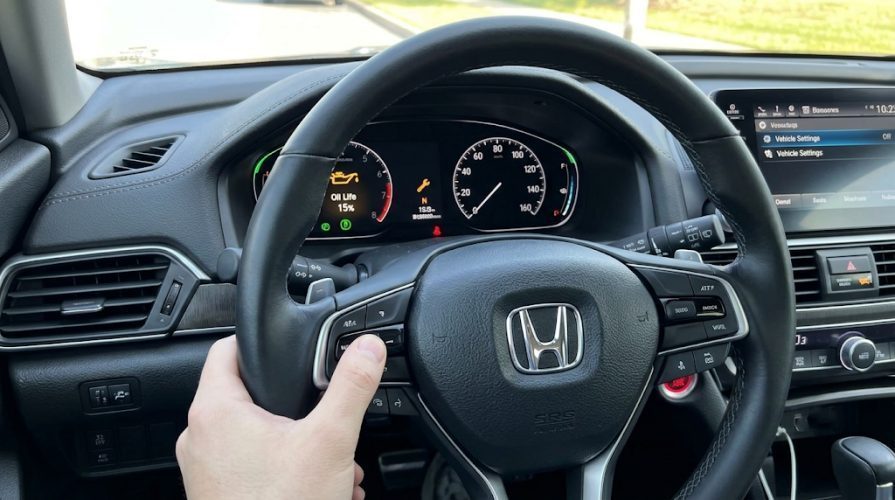
Did your oil change light or "Oil Life" monitor stay on after a fresh service? Whether a quick lube shop forgot the final reset or you changed the motor oil yourself, resetting the oil life monitor on a Honda Accord back to 100% takes under 60 seconds without special OBD2 scan tools.
Because Honda has redesigned instrument clusters and infotainment systems across multiple generations, the exact button sequence depends on your model year. Use the quick selector below to jump straight to your vehicle's setup.
⚡ Quick Answer: Standard 3-Step Reset Method
1. Turn ignition to ON (II) without cranking the engine.
2. Press the Trip/Reset button or steering wheel scroll wheel until Oil Life % displays.
3. Press and hold the reset control for 10 seconds until the percentage blinks, release, then hold for another 5 seconds until it resets to 100%.
⚠️ Did You Actually Change Your Motor Oil?
Never reset your oil life monitor without fresh lubricant. Driving on depleted 0W-20 fluid risks costly VTC actuator rattle and turbocharger wear. If you need a fast oil replacement without leaving your car, claim verified drive-thru savings:
10th & 11th Gen Honda Accord (2018–2026)
These models feature modern digital driver displays and central touchscreen menus.
Method 1: Using Steering Wheel Thumbwheel (Fastest)
- Sit in the driver's seat and close all doors.
- Press the ENGINE START/STOP button twice without touching the brake pedal (puts the car in ON mode).
- Press the Home button located on the left spoke of the steering wheel.
- Roll the left thumbwheel down until you highlight the Maintenance menu (wrench icon), then press the wheel inward to select.
- Scroll to highlight Oil Life.
- Press and hold down the thumbwheel for roughly 10 seconds until the display enters the reset menu.
- Scroll to select Item A Only or All Due Items, then press the thumbwheel to confirm. The cluster will immediately read Oil Life: 100%.
Method 2: Using the Center Touchscreen Display
- Power on the infotainment system.
- Tap Settings on the home screen.
- Select Vehicle → scroll down to Maintenance Info.
- Tap Select Reset Items.
- Choose All Due Items (or specific sub-codes), then tap Reset.
9th Gen Honda Accord (2013–2017)
Ninth-generation models differ depending on whether you drive a base trim (LX) or a higher trim with touch screens (EX, EX-L, Touring).
For Models With Push-Button Start & Touchscreen:
- Press Engine Start twice without pressing the brake pedal.
- Press the physical Settings button below the dash screen.
- Navigate to Vehicle Settings → scroll down to Maintenance Info.
- Select Maintenance Reset, highlight Reset, and press Enter.
For Models With Turn-Key & Instrument Cluster Knob (LX):
- Turn the key to the ON (II) position.
- Repeatedly tap the Select/Reset knob sticking out of the speedometer cluster until remaining oil life percentage displays.
- Press and hold the knob down for 10 seconds until the oil life percentage and code start blinking.
- Release the knob, then immediately press and hold it down again for 5 seconds until it flips to 100%.
8th Gen Honda Accord (2008–2012)
Eighth-generation Accords rely strictly on the instrument panel trip odometer stem.
- Insert your ignition key and turn it to position II (ON) without starting the engine.
- Press the Trip/Reset stem on the gauge cluster repeatedly until the engine oil life indicator appears (e.g., Oil Life 15%).
- Press and hold down the stem for approximately 10 seconds until the oil percentage display and wrench icon begin blinking.
- Release the stem.
- Press and hold the stem down again for 5 seconds. The maintenance display will clear and reset back to 100%.
7th Gen Honda Accord (2003–2007)
Seventh-gen Accords use a manual lockout button hold to reset the yellow MAINT REQD warning light.
- Turn the ignition key completely to the OFF (0) position.
- Press and hold down the Select/Reset button on the dashboard gauge cluster.
- While continuing to hold down the button, turn the key to the ON (II) position with your other hand.
- Keep holding the reset button down firmly for about 10 seconds.
- The yellow MAINT REQD light will blink and turn completely off.
- Release the button and start the car to confirm the light stays off.
What Do Honda Maintenance Minder Codes Mean?
When your Accord's oil life drops to 15%, the cluster displays a main letter (A or B) and secondary numbers (1 through 6). Here is what each alert requires:
| Minder Code | Recommended Service |
|---|---|
| A | Replace engine oil only. |
| B | Replace engine oil and filter; inspect brake pads, tie rods, and suspension boots. |
| 1 | Rotate tires and verify air pressure. |
| 2 | Replace engine air filter and cabin dust/pollen filter. |
| 3 | Drain and refill automatic transmission fluid (ATF). |
| 4 | Replace spark plugs and inspect valve clearance. |
Troubleshooting: Why Won't My Honda Accord Oil Light Reset?
If the oil life percentage does not return to 100% after following these steps:
- Ignition Mode Error: Ensure the car is in the true ON (II) accessory position—not merely "Accessory (I)". All dashboard warning lights must illuminate before you begin holding the button.
- Timing Issue: You must start the second 5-second press immediately after releasing the button while the digits are still actively blinking. If the screen stops flashing, turn the ignition off and restart from Step 1.
- Door Ajar Warning: On 2018–2026 models, having the driver door open can override the maintenance cluster display with a door ajar alert. Shut all doors firmly before attempting the reset.